
Streamlining terminology lookup processes: automated glossary exports and model choice for the lookup assistant
Summary
A terminology lookup assistant at a multinational tech organisation was tested with 16 AI models, and 11 passed the quality floor. Accuracy was similar across those 11, but cost and time were not: cost per run varied about 15 times and time about four times. The model in use at the time was the most expensive and the least stable of the five finalists. No model won on every measure, so the final choice depends on whether the team values low cost, speed or steady accuracy. The measure used throughout is cost per accepted lookup.
The challenge
At a multinational tech organisation, the only source of truth for official terminology was a termbase hosted in QTerm and owned by the localisation team. All teams, in all languages, could access this glossary. But it had to be searched inside the QTerm interface, which is not intuitive for users who do not work with it daily.
When the organisation adopted AI broadly, any team that wanted to use official terminology in its AI setups had to go back to QTerm. They had to download a static CSV file with all the terminology, sort the data as they saw fit, and upload the file to their AI tools. But the glossary is a live source of knowledge that changes quickly, so the downloaded files became outdated very fast. Even the localisation team’s own assistants, used for translating and adapting English content for foreign markets, relied on this static file, and their copies also went out of date sooner than expected.
This process was inaccurate and difficult to maintain, and it created significant friction. The localisation team asked all teams to take into account the official termbase, and only that termbase. But looking up terms was so manual, unintuitive and cumbersome that many teams, from Marketing to Sales and Customer Success, were translating official terms themselves, as they saw fit.
Two new setups fixed this: an automated glossary export running regularly, and a Glean assistant for optimised lookups, so all teams across the organisation had access to approved, current terminology whenever they needed it.
Goal and setup
The goal was to give every team one reliable place to check official terminology, and to run it fast and at a low cost.
A simple automation was set up. A script in Google Apps Script reads the full termbase from QTerm twice a week and writes it to a Google Sheet in a shared Drive folder. The script always overwrites the same sheet, so the link never changes. This matters because AI tools remember the old link when a new file is created. The sheet has one row per term per language, in 17 languages, with the definition, usage notes and flags such as forbidden or outdated terms. Teams now had a single resource in Drive, with a fixed link, that they could feed into their own AI tools and adapt to their own use cases.
For teams that connect their AI tools to this file, this meant no more manual downloads and uploads. But the organisation still needed one central place to check official terminology, for all teams from Sales to Marketing to Customer Success. It had to be reliable, fast and cost efficient.
The solution was a Glean lookup assistant, set up to read the Drive file, process queries quickly and return accurate answers. Many teams ran a large number of queries at once, so the assistant had to handle large batches. Teams such as Customer Success and Sales needed terminology during live calls, so they needed very low latency, meaning almost instant answers.
The assistant’s instructions were built over about 20 iterations. The first version passed 71% of a test of 120 queries. Version 10 passed 97.5%. The final instruction set was then locked. The assistant ran on Sonnet 4.6, the organisation’s default at the time of setup, and the control model, the reference for comparison in the tests below. It was still to be seen whether another model could give the same accuracy at a lower cost and in less time.
How the models were tested
The goal of the test was to find the most efficient model for the assistant. The success criteria were written before any run. The measure used throughout is cost per accepted lookup. A lookup is accepted when the term, the language and the status of the term (current or outdated) in the answer are correct.
- Queries: 50, with the same wording, order and sending method in every run, sent as one message. The instructions were tuned on a larger test that included these 50, and 50 queries were judged enough to compare the models without raising the cost of testing. Only the instructions were tuned; the models themselves were not changed.
- Conditions: same instructions, same glossary, and the assistant preview restarted before every run. This way no memory of earlier runs was kept, and the model could not learn from past answers.
- Grading: the owner of the assistant reviewed the expected answers against the glossary. A Claude agent graded the answers, and the owner read every failure and borderline answer.
- Two scores: permissive means the term, language and status are correct. Strict also requires a complete and clean answer. An accepted lookup is a permissive pass.
- Quality floor: no invented terms and no outdated term given as current. A false “not found” counts as an accuracy failure. It breaks the floor only if it also hides an outdated term.
- Stage 1: 16 models, one run each, on two consecutive days.
- Stage 2: five models, chosen after Stage 1 by a stated rule: repeat a model only if no other model matches its accepted count with less time and lower cost. Each had three runs in total, including the Stage 1 run. The control, Sonnet 4.6, was the model of the original baseline.
What the model test showed
Accuracy hardly separated the models. Eleven of the 16 passed the quality floor in Stage 1, with strict scores between 90% and 98%. Cost and time did separate them. Among those eleven, cost per run went from $0.05 to $0.73, about 15 times, and time from 71 s to 287 s, about four times.
Four models did not pass. Gemini 3.8 Flash missed one outdated term, and GLM 5.3 invented one term. The two GPT Luna models passed only 36% and 14% of the queries. Both Luna models did search the glossary, but why they failed was not established, and only one trace (the record of the steps the assistant took) was checked for each. The control was not checked against the quality floor in Stage 1. That makes eleven that passed, four that did not and one not verified, 16 in total. Opus 5 was cut off at query 44 in its first run and was repeated.
Five models were then run three times each. Against the control, the four challengers cost about 2.6 to 15 times less per accepted lookup.
| Model | Strict average (range) | Seconds per accepted | Cost per accepted | Time range (s) | Cost range |
|---|---|---|---|---|---|
| Sonnet 5.5 | 98% (no variation) | 2.6 | $0.005 | 115 to 141 | $0.25 to $0.29 |
| Gemini 4 Hydrogen | 94% (92 to 96) | 2.1 | $0.004 | 77 to 139 | $0.16 to $0.23 |
| GPT 6.2 Sol | 91% (82 to 96) | 1.5 | $0.004 | 71 to 79 | $0.17 |
| Haiku 5.5 | 93% (92 to 96) | 4.2 | $0.001 | 173 to 232 | $0.03 to $0.06 |
| Sonnet 4.6 (control) | 91% (78 to 98) | 3.9 | $0.014 | 157 to 235 | $0.58 to $0.92 |
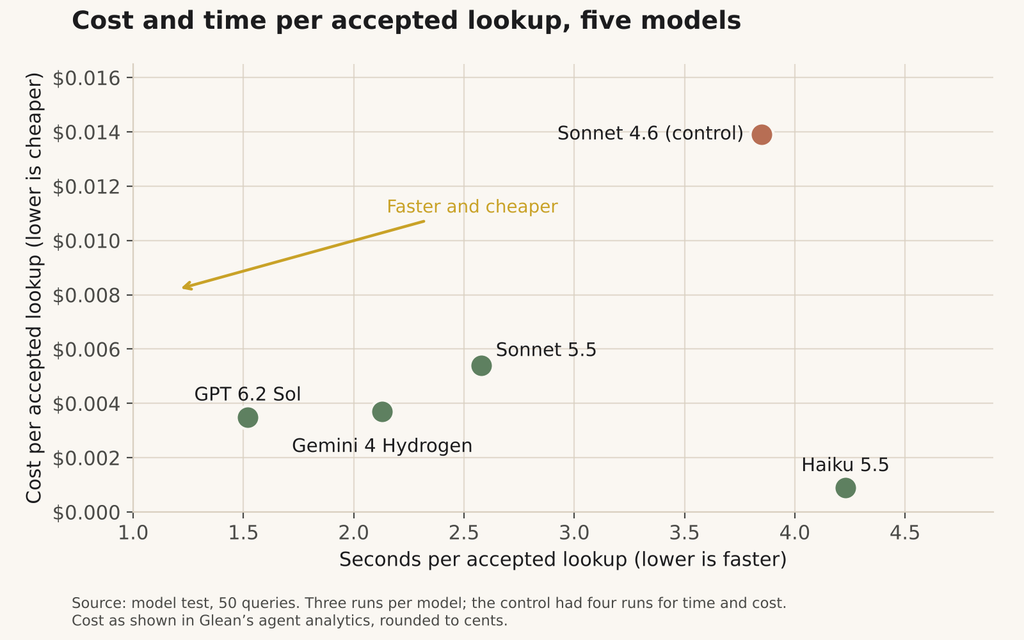
One run is not a safe basis. On identical queries, the control’s strict score ranged from 78% to 98%, its time from 157 s to 235 s and its cost from $0.58 to $0.92. It also missed the same outdated term in both of its last two runs.
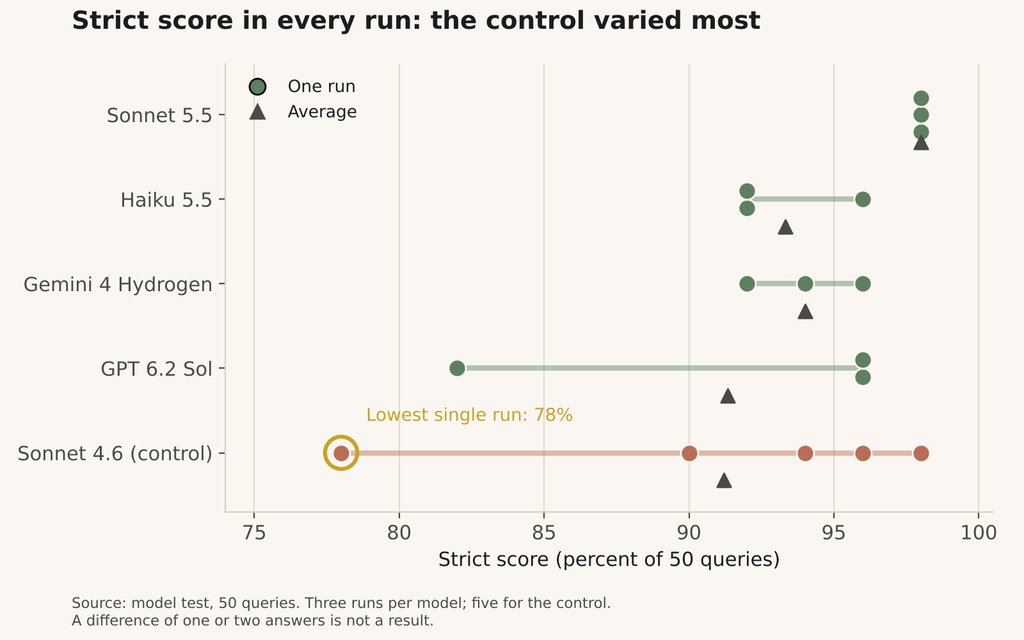
Sol was steady in cost and time, but one of its three runs had five answers that wrongly said “not found”. Sonnet 5.5 scored 98% strict in all three runs.
Decision table
| If the priority is | Candidate | What comes with it |
|---|---|---|
| Lowest cost | Haiku 5.5 | Slowest of the five, strict 93% |
| Fastest answers | GPT 6.2 Sol | One run in three had false “not found” answers |
| Steadiest accuracy | Sonnet 5.5 | About 2.6 times cheaper than the control |
| Balance of speed and cost | Gemini 4 Hydrogen | Strict 92% to 96%, time varied from 77 s to 139 s |
What could not be measured
- How much the answers vary beyond three runs per model.
- Time includes server load. The control took 157 s at the start and 235 s at the end of the second round, with similar accuracy.
- Cost is the figure shown in Glean’s agent analytics after each run. It covers all 50 queries, not one lookup, and is rounded to cents.
- The grader is a Claude model, and Claude models were part of the test.
- Strict scores depend on the owner’s calls on borderline answers. A difference of one or two answers is not a result.
- The instructions were tuned on the same 50 queries used in the test. Each run started from a fresh preview, so no memory carried over, but the instructions may still favour the model it was tuned on. Every model received the same instructions.
What the team could see and decide
My part was to give the team numbers to decide from. The team can now see that every team has access to one source of official terminology that refreshes itself, that accuracy is similar across the models that work, that cost and speed differ widely, and that a single run can mislead. The choice between lowest cost, fastest answers and steadiest accuracy is theirs. My work ended at the numbers.
This test is only a snapshot. Models, prices and instructions change, so it is meant to be repeated. Read more about why ongoing governance is essential in AI workflows.
If you would like to know more and take a look at the anonymised assistant instructions and test files, get in touch.

TOKEN RECEIPT: The Google Apps Script for the automation was written with Claude Code. The case study was drafted with Claude Sonnet 5.5 and cross checked with GPT-6, followed by extensive human review. The test runs themselves were done in Glean, which is where most of the tokens went.
Estimated tokens, Claude Code: ~2,000,000, including iterations and fixes, mostly cached | Estimated cost: ~£3
Estimated tokens, Claude Sonnet 5.5 and GPT-6 (grading, drafting and checks): ~1,000,000 of new content, 10 to 20 million processed because the context is re-sent every turn, mostly cached | Estimated cost: ~£10
Estimated tokens, Glean test runs (27 timed runs): ~2 to 4 million | Cost as logged: ~$8.50 (~£7)
About £7 of test runs found models that cost up to 15 times less per lookup. Skipping the test would have been the expensive option.